GUI is upgraded to support Charger Board
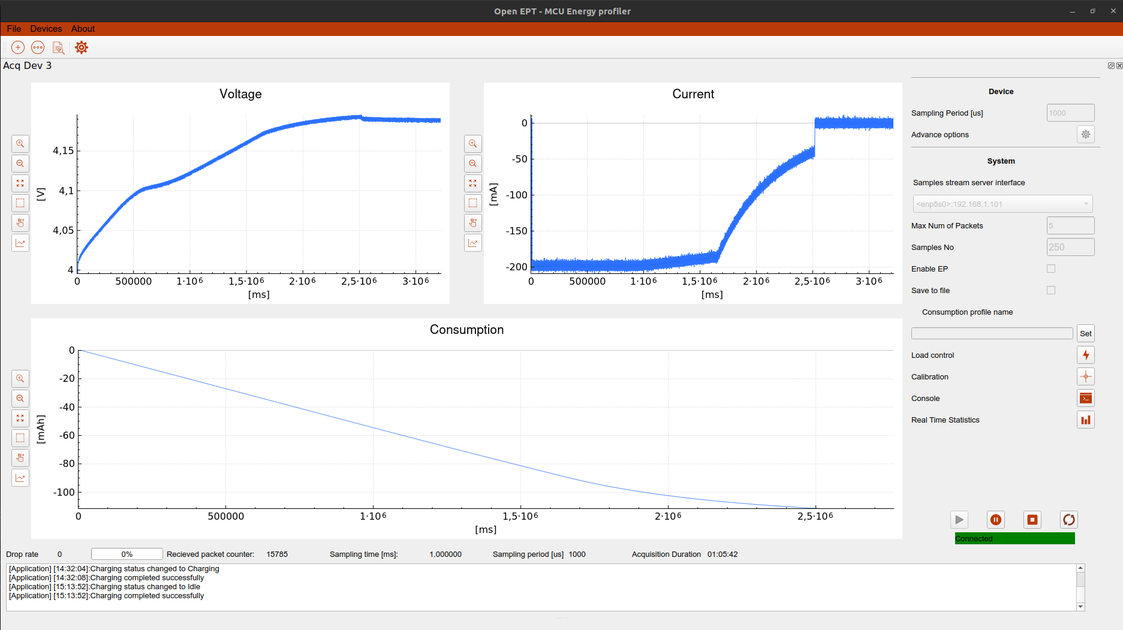
In our previous development updates, we presented the design of the OpenEPT Charger Board and the implementation of its firmware. With the hardware and firmware functionality in place, the next step was to integrate the Charger into the existing OpenEPT GUI and expose its configuration, control, and monitoring functionality to the user. Instead of introducing a separate application for the Charger, we extended the existing OpenEPT GUI. This allows the Charger to become part of the same workflow already used for configuring the Energy Profiler Probe, controlling measurements, and analyzing acquired voltage and current data.
The complete OpenEPT GUI is available as open-source software in the OpenEPT GUI repository.
In This Update
This development update focuses on three main areas:
- Charger Configuration – integration of Charger parameters and persistent configuration into the existing device configuration interface.
- Charger Control and Monitoring – the interface used to configure the charging process, start and stop charging, and monitor the current Charger state.
- Charging and Energy Profiling – using the Charger together with the Energy Profiler Probe while observing the battery voltage, charging current, and accumulated consumption.
Integrating the Charger into the Existing GUI
The OpenEPT GUI already provides the infrastructure required to communicate with connected devices, expose device parameters, and present runtime information. For this reason, Charger support was implemented as an extension of the existing application rather than as a separate tool. The integration is divided into two main parts. Persistent Charger parameters are incorporated into the existing device configuration mechanism, while charging control and runtime information are provided through a dedicated Charger interface. This keeps configuration operations separated from actions that are performed while the Charger is actively being used. From the user's perspective, the Charger therefore becomes another component of the OpenEPT system: its persistent configuration can be managed together with other device parameters, while its runtime state can be controlled and monitored from the main application.
Charger Configuration
The Charger configuration interface is implemented as an extension of the existing OpenEPT configuration window. The main implementation is available in:
Communication between the configuration interface and the connected device is handled through:
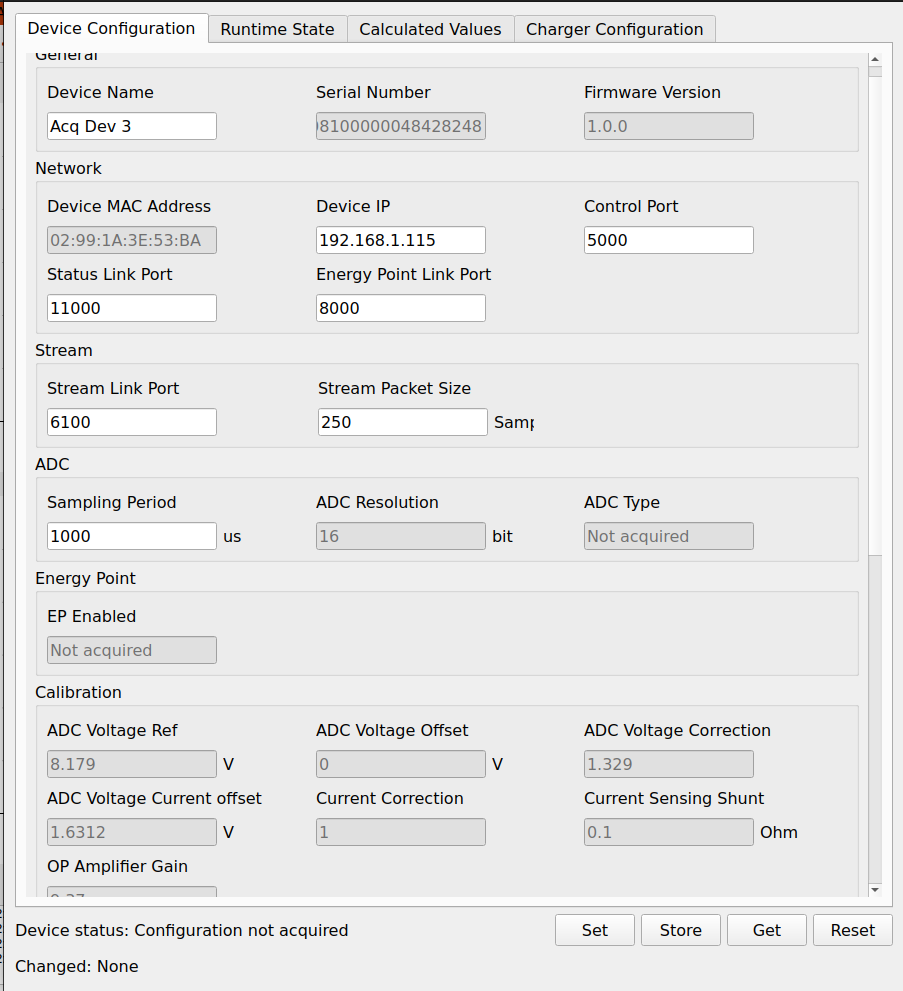
The existing OpenEPT configuration mechanism was extended to support the Charger rather than introducing a separate configuration window. The ConfigurationWnd class builds its interface dynamically from the parameter groups available in the ParameterStore. As a result, the newly introduced Charger parameters appear as an additional Charger Configuration tab while preserving the same configuration workflow already used for the Energy Profiler Probe.
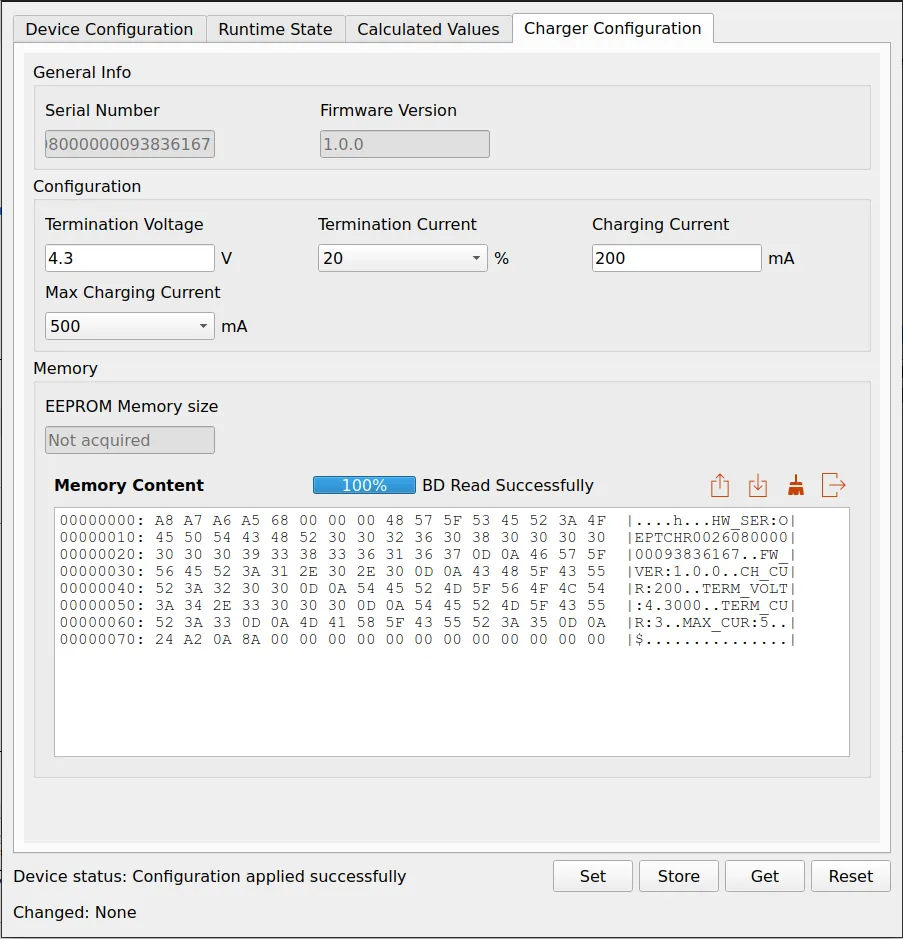
The configuration window creates its tabs directly from the available parameter groups:
QList<Params::GroupMeta> groups = m_params->getAllGroupMeta();

for(const Params::GroupMeta &groupMeta : groups)
{
    QWidget *tab = createTab(groupMeta.id);

    if(tab != nullptr)
    {
        tabWidget->addTab(tab, groupMeta.name);
    }
}
This means that the GUI layout is not hard-coded specifically for the Charger. Charger parameters are defined through the same parameter metadata used by the rest of the application, including their display name, unit, editor type, access permissions, and grouping. ConfigurationWnd uses this information to create the corresponding Qt controls. Depending on the parameter definition, the value is represented either by a QLineEdit or a QComboBox:
if(param.meta.editor == Params::Editor::ComboBox)
{
    QComboBox *comboBox = new QComboBox(this);

    comboBox->setFixedWidth(CONFIG_FIELD_WIDTH);
    comboBox->setToolTip(param.meta.description);
    comboBox->addItems(param.meta.allowedValues);

    field = comboBox;
}
else
{
    QLineEdit *lineEdit = new QLineEdit(this);

    lineEdit->setFixedWidth(CONFIG_FIELD_WIDTH);
    lineEdit->setToolTip(param.meta.description);

    field = lineEdit;
}
With this approach, parameters such as Termination Voltage, Termination Current, Charging Current, and Max Charging Current are integrated into the same configuration infrastructure as the existing OpenEPT parameters. Read-only information, such as the Charger serial number and firmware version, is handled by the same mechanism but presented as non-editable fields.
Applying Charger Configuration
The existing Set, Store, Get, and Reset workflow is also reused for the Charger. An important implementation detail is that ConfigurationWnd keeps track of the values that were previously applied to the device. When a field is modified, the current value is compared with the stored applied value, allowing the GUI to identify exactly which parameters have changed.
Before applying a configuration, the changed parameters are separated according to their parameter group:
QMap<QString, QString> changedDeviceFields =
    getChangedFields(
        static_cast<Params::GroupId>(
            DeviceParamDefs::Group::DeviceConfig));

QMap<QString, QString> changedApplicationFields =
    getChangedFields(
        static_cast<Params::GroupId>(
            DeviceParamDefs::Group::ApplicationConfig));

QMap<QString, QString> changedChargerFields =
    getChangedFields(
        static_cast<Params::GroupId>(
            DeviceParamDefs::Group::ChargerConfig));
The Charger configuration can therefore share the same configuration window and user workflow while remaining logically separated from the configuration of the Energy Profiler Probe. This also allows the status bar at the bottom of the window to report parameters that have been modified but not yet applied. Once the configuration has been successfully applied, the current field values become the new reference values used for subsequent change detection.
Charger EEPROM Access
In addition to the Charger parameters, the configuration interface provides direct access to the configuration memory located on the Charger board. This functionality is implemented as a Charger-specific extension of the memory viewer already available for the Energy Profiler Probe. The distinction is made directly when the configuration layout is generated:
bool isChargerBD =
    (group == static_cast<Params::GroupId>(
                  DeviceParamDefs::ChargerConfig) &&
     subGroupMeta.id == static_cast<Params::SubGroupId>(
                  DeviceParamDefs::ChargerBD));
When the ChargerBD subgroup is encountered, ConfigurationWnd adds the dedicated Charger memory widget:
else if(isChargerBD == true)
{
    QVBoxLayout *vLayout = new QVBoxLayout();

    if(visibleParams.isEmpty() == false)
    {
        vLayout->addLayout(createParamsGrid(visibleParams));
    }

    vLayout->addWidget(createChargerBDMemoryWidget());

    groupBox->setLayout(vLayout);
}
The memory widget provides operations for reading the current EEPROM content, updating it from a file, formatting the memory, and exporting its content to the host PC. These operations are exposed from ConfigurationWnd through dedicated Qt signals:
void sigChargerBDContentGetRequest();
void sigChargerBDContentSetRequest(QByteArray content);
void sigChargerBDFormatRequest();
For example, requesting the current EEPROM content does not perform device communication directly from the GUI widget. Instead, the button handler emits a request:
void ConfigurationWnd::onChargerBDGetClicked()
{
    emit sigChargerBDContentGetRequest();
}
The request is then handled by the device layer, keeping the configuration window independent from the actual communication protocol. The same separation is used for updating and formatting the Charger EEPROM. The returned EEPROM data is displayed using a hexadecimal memory view with 16 bytes per row and an ASCII representation on the right. ConfigurationWnd also keeps the previously received EEPROM image and highlights bytes that changed between two reads. This makes the memory view useful not only for normal configuration management but also for verifying the actual persistent representation of Charger parameters during development. Together, these extensions integrate the Charger configuration into the existing OpenEPT parameter-management architecture without duplicating the complete configuration subsystem. The GUI remains responsible for presenting and editing parameters, while DeviceContainer and Device provide the bridge toward the firmware communication interface.
Charger Control and Monitoring
While the configuration page is intended for persistent device parameters, normal interaction with the Charger is performed through a dedicated Charger tab in the runtime control interface.
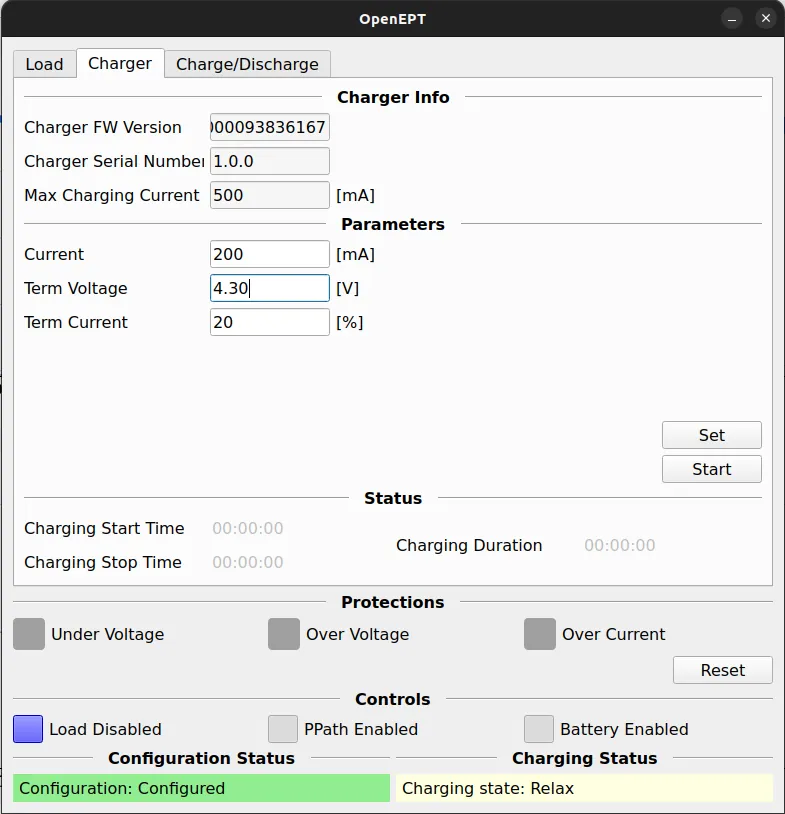
The interface is divided into several functional areas that correspond to the information and operations required during a charging session.
Charger Information and Parameters
The Charger Info section displays information obtained from the connected Charger, including its firmware version, serial number, and configured maximum charging current.
The Parameters section contains the values that can be adjusted for the current charging operation:
- charging current;
- termination voltage;
- termination current.
The Set operation transfers the selected values to the Charger before or during the charging workflow. This makes it possible to adjust the charging parameters directly from the application without accessing the firmware console or modifying the persistent configuration manually.
Starting and Monitoring Charging
Charging can be controlled directly from the Charger tab using the dedicated charging control. Once charging is started, the GUI monitors the state reported by the Charger and presents the current charging status to the user. The Status section is intended to provide information about the active charging session, including charging start time, stop time, and total charging duration. In addition to the charging process itself, the interface exposes the state of several signals associated with the Charger hardware.
Charging and Energy Profiling
An important aspect of the Charger integration is that charging does not take place in isolation from the rest of the OpenEPT toolset. The Charger can be used together with the Energy Profiler Probe, allowing the charging process to be observed using the same acquisition and visualization functionality normally used for energy profiling.
The figure above shows an example charging session with a configured charging current of approximately 200 mA. The voltage plot shows the battery voltage increasing during charging, while the current plot shows the evolution of the charging current as the battery approaches the configured termination conditions. Because the Charger is integrated into the existing OpenEPT workflow, the measurement interface remains available during this process. Voltage and current can therefore be recorded and analyzed using the same acquisition infrastructure used for normal OpenEPT measurements. This provides a useful connection between battery charging and energy profiling: the GUI is not only used to configure and start the Charger, but can also be used to observe the electrical behavior of the complete charging process.