Building OpenEPT Device Configuration Images
OpenEPT's firmware configuration mechanism gives every device a common way to define, load, change, and persist its parameters. But before a freshly manufactured board boots for the first time, that configuration has to already be sitting there waiting for it. Things like the hardware serial number, measurement parameters, communication settings, and any initial files a device needs have to be converted into whatever format its non-volatile memory expects, and that has to happen before the firmware ever runs. That's what we built during Milestone 3 of the second OpenEPT development phase: a host-side configuration build system. It's really a handful of small utilities that generate and extract System parameter images, build LittleFS filesystem images, keep track of OpenEPT hardware serial numbers, and stitch together complete memory images for the devices that need one.
Everything covered here lives in the OpenEPT Utilities repository, our main home for host-side tooling. We keep it separate from the individual firmware repos on purpose: it means configuration generation doesn't depend on any one firmware project, and the same infrastructure can be reused across every OpenEPT device.
The configuration-related tools are organized into the following directories:
- System image utilities: config/system
- LittleFS utilities: config/filesystem
- Complete EPP image utilities: config/image
- Example configurations: config/examples
The build system splits into three layers. System utilities work on the persistent System parameter region and cover the functionality every OpenEPT device needs. Filesystem utilities generate and extract LittleFS images. And image utilities glue the relevant regions together into one complete memory image, for the devices that actually need one.
In This Update
In this update we'll walk through the whole configuration build system: the input parameter format, the build directives, the command-line tools, how generated parameter values and serial numbers work, the binary System image format, LittleFS image generation, building a complete EPP memory image, and extracting one back out. The same System image mechanism serves both the Energy Profiler Probe (EPP) and the OpenEPT Charger; the differences between them, like System region size or whether a filesystem exists at all, live entirely in the input configuration and the build utility you point at it.
Configuration Build System
Here's how the configuration tools are currently laid out inside the OpenEPT Utilities repository:
config/
├── examples/
│   ├── charger/
│   │   └── systemParams.txt
│   └── epp/
│       ├── systemParams.txt
│       └── fs/
├── filesystem/
│   ├── extract.py
│   └── gen.py
├── image/
│   ├── extract.py
│   └── gen.py
└── system/
    ├── extract.py
    ├── gen.py
    └── serials/
This split matters because OpenEPT devices don't all share the same persistent-memory layout. The EPP has both a dedicated System region and a LittleFS filesystem, while the Charger, at least for now, only uses System storage. Even so, both boards run through the same System image generator and the same parameter description format.
System Parameter File
System image generation starts from a plain, human-readable systemParams.txt file. It mixes two things together: information the host-side generator needs, and the actual parameters that end up in the persistent System region. Here's what that looks like for the OpenEPT Charger:
@DEVICE_TYPE:CHR
@SERIAL_EXTRA_DATA:1000000
@SYSTEM_SIZE:128

HW_SER:<gen>
FW_VER:1.0.0
CH_CURR:100
TERM_VOLT:4.2
TERM_CUR:3
MAX_CUR:5
There are two kinds of lines in that file, and that's deliberate. Anything starting with @ is a build directive, read only by the host-side generator and never by the firmware. Everything else is an actual System parameter. So a build directive looks like this:
@DIRECTIVE:valueand a firmware parameter looks like this:
PARAMETER:valueBuild directives never make it into the firmware parameter payload; they only describe how to generate the image: which OpenEPT device it's for, how big it needs to be, and what the serial-number generator needs to know. Keeping that separate means a single systemParams.txt file can fully describe how to build a System image without leaking generator-specific details into the parameter database the firmware actually reads.
Build Directives
Build directives carry the metadata the generator needs. Right now the format supports four of them: device type, serial-number extra data, System image size, and an optional explicit device number.
@DEVICE_TYPE
@DEVICE_TYPE says which OpenEPT board the image is being built for.
For the Energy Profiler Probe:
@DEVICE_TYPE:EPPFor the OpenEPT Charger:
@DEVICE_TYPE:CHRIt matters most during serial-number generation, since device numbers are tracked separately per board type, so each product family gets its own numbering sequence. Here are the board identifiers defined so far:
EPP    Energy Profiler Probe
CHR    Charger
CLP    Compact Low Power
CHP    Compact High Power
@SERIAL_EXTRA_DATA
The OpenEPT serial-number format reserves seven characters for extra, device-specific information. You set that value directly:
@SERIAL_EXTRA_DATA:1000000Making this its own build directive keeps serial-number generation independent of how individual firmware parameters get interpreted. The build system never has to figure out what a shunt resistance or a charging setting actually means just to put together a hardware serial number.
@SYSTEM_SIZE
Different OpenEPT devices set aside different amounts of storage for System parameters, so the size of the resulting binary image is something you specify in the parameter file rather than something hardcoded into the generator.
For the Energy Profiler Probe:
@SYSTEM_SIZE:4096defines a 4096-byte, or 4 KiB, System region.
For the OpenEPT Charger:
@SYSTEM_SIZE:128defines a 128-byte System region.
Which means one system/gen.py script handles devices with completely different memory layouts, with no separate implementation needed per board.
@DEV_NUMBER
Device numbers are normally assigned automatically, but you can request a specific one:
@DEV_NUMBER:15This one's optional, mainly useful when you need to regenerate an image for a device that already physically exists. Leave it out and the generator just looks up the last assigned number for that board type and picks the next one. Specify it, and the generator checks the serial-number registry for that exact board/device-number pair: if the device is already registered, it reuses the existing serial number, and if not, it generates a new one using the number you gave it.
Generated Parameter Values
Individual System parameters can also ask to be filled in automatically, using the <gen> token. For the Energy Profiler Probe, the hardware serial number can be specified as:
HW_SERIAL:<gen>while the Charger uses:
HW_SER:<gen>The generator recognizes both field names. The EPP can also ask for its MAC address to be generated the same way:
MAC_ADDRESS:<gen>Whenever the generator sees <gen>, it never stores that literal string. Instead, it generates a real value and drops that into the serialized payload. Which means the exact same configuration template can be reused across many physical devices, and each one still gets its own device-specific values at build time. An example EPP parameter file can therefore be written as:
@DEVICE_TYPE:EPP
@SERIAL_EXTRA_DATA:1000000
@SYSTEM_SIZE:4096

HW_SERIAL:<gen>
FW_VERSION:1.0.0
SENS_SHUNT:0.1
SENS_GAIN:9.37
MAC_ADDRESS:<gen>
So the configuration file itself stays readable and easy to version-control, and only the values that genuinely need to be unique per device get generated when the binary image is actually built.
OpenEPT Hardware Serial Numbers
Serial-number generation isn't a separate step bolted on afterward; it happens right inside the System image build process. An OpenEPT serial number packs several fields describing the physical device:
OEPT
Board
Device Type
Year
Month
Extra Data
Device Number
OEPT just marks it as part of the OpenEPT ecosystem. Board identifies the hardware family; year and month record when that device identity was generated. Extra Data carries the seven characters we talked about above, and the last eight digits are the device number, unique per board type rather than globally across every OpenEPT product. So both of these are perfectly valid, distinct device identities:
EPP / 00000001
CHR / 00000001
Each hardware family gets to run its own counter, and the full serial number still comes out unique.
System Image Binary Format
Once the build directives are processed and any generated values are resolved, the actual firmware parameters get serialized into the System image as plain key-value text. An EPP payload, conceptually, looks something like:
HW_SERIAL:value
FW_VERSION:1.0.0
SENS_SHUNT:0.1
SENS_GAIN:9.37
MAC_ADDRESS:value
Each entry ends with a CRLF, and the binary System region itself breaks down into four parts:
- Header (8 bytes): the magic value (4 bytes) plus the payload size (4 bytes).
- Parameter payload (variable size): the serialized System parameters, in that same key-value text format.
- CRC32 (4 bytes): checks the integrity of the payload.
- Padding (variable size): fills whatever's left so the image matches the size set by
@SYSTEM_SIZE.
The header carries the fixed magic value:
0xA5A6A7A8along with the size of the serialized payload. The CRC32 sits right after the parameter data and lets you verify the System parameters weren't corrupted. Whatever space is left gets padded out until the image hits the size given by @SYSTEM_SIZE. None of this depends on how big the System region actually is: the same format produces a 128-byte Charger image just as easily as a 4096-byte EPP one. The generator also checks that header, payload, and CRC actually fit inside the requested System region. If a configuration doesn't fit, it fails loudly instead of quietly truncating into a broken image.
Generating a System Image
The System image generator is available as:
config/system/gen.pyThe general command-line syntax is:
python3 system/gen.py <system-parameters> <output-image>
First argument is the input systemParams.txt, second is where the binary output goes. For the OpenEPT Charger:
python3 system/gen.py \
    examples/charger/systemParams.txt \
    charger_system.bin
For the Energy Profiler Probe:
python3 system/gen.py \
    examples/epp/systemParams.txt \
    epp_system.bin
Behind the scenes, the generator reads the directives and parameters from the input file, resolves anything marked <gen>, handles serial-number allocation, serializes the payload, computes the CRC32, pads it out, and writes the binary image. Notice the output size comes from @SYSTEM_SIZE, not from anything on the command line. That keeps device-specific memory info bundled with the configuration itself, rather than something you have to remember to pass in every time.
EPP LittleFS Filesystem
Beyond the System region, the EPP also carries a persistent LittleFS filesystem. It's used for regular persistent firmware files, including the user configuration the EPP Configuration service manages. System parameters describe the physical device and live in their own dedicated region; the filesystem, by contrast, gives us structured storage for data that can be managed completely separately from that board-specific System information. You'll find the filesystem tools under config/filesystem in the Utilities repository.
The current EPP filesystem geometry is:
Block size:       256 B
Block count:      1008
Filesystem size:  258048 B
                  252 KiB
The filesystem image gets built straight from an ordinary directory on your machine, e.g.:
examples/epp/fs/
├── config/
│   └── device.cfg
└── logs/
    └── raw.bin
The build utility just walks that directory recursively and recreates the same files and folders inside the generated LittleFS image. So the initial filesystem content stays as plain, inspectable files in the Utilities repo, and nobody has to hand-edit a raw filesystem binary. The Charger, as it stands, has no filesystem at all, so its build workflow only ever touches the System image utilities.
Generating a LittleFS Image
The LittleFS generator is available as:
config/filesystem/gen.pyIts general command-line syntax is:
python3 filesystem/gen.py <source-directory> <output-image>
For the EPP example filesystem:
python3 filesystem/gen.py \
    examples/epp/fs \
    epp_filesystem.bin
First argument: the host directory to load into LittleFS. Second: where to write the resulting binary image.
The resulting image has a fixed size of:
258048 bytesmatching the 252 KiB filesystem region reserved in EPP's persistent memory.
Since it's fully independent from System image generation, you can reach for it on its own whenever you just need to change or inspect the filesystem content.
Complete EPP Memory Image
EPP's persistent memory is really just the System region and the LittleFS region sitting back to back, forming one complete 256 KiB image.
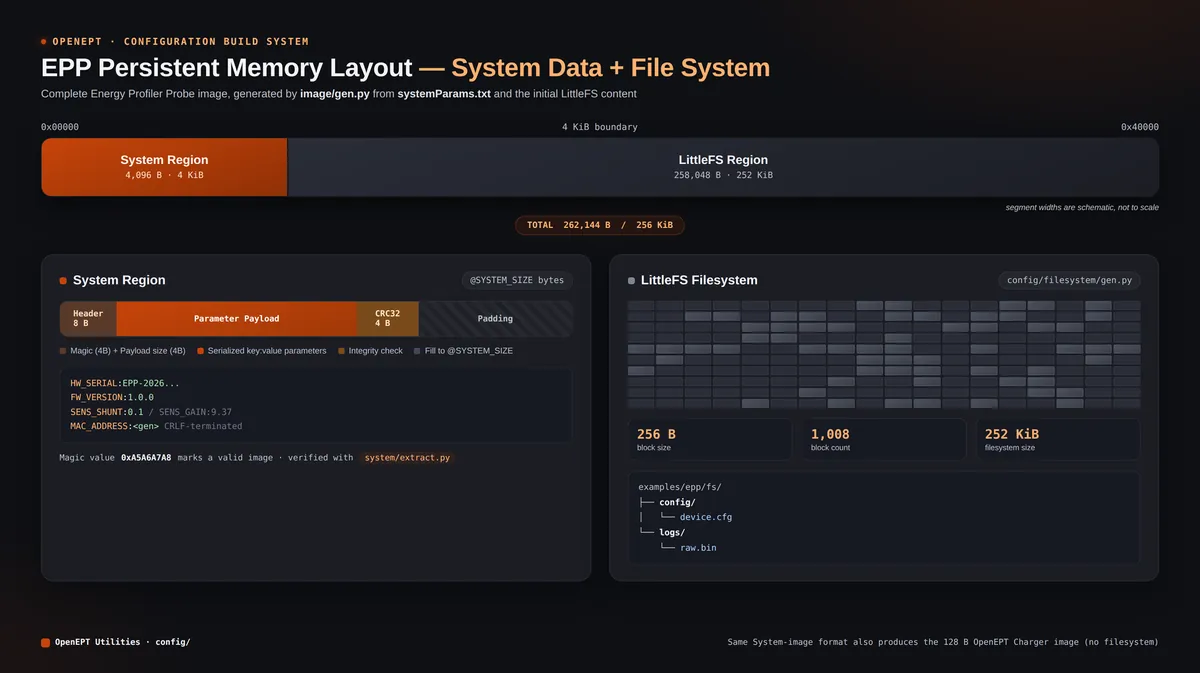
It's the same breakdown covered above, just drawn out: the 8-byte header, parameter payload, CRC32, and padding on one side, and the 256-byte LittleFS blocks with their file tree on the other, both measured against the full 256 KiB image. The tools that build this complete image live under config/image in the Utilities repository. The complete EPP image generator doesn't reimplement either region from scratch; it just calls into the existing System and filesystem generators. That keeps the lower-level tools usable on their own, while still giving you one single command to prepare the whole EPP persistent memory.
Generating a Complete EPP Image
A complete EPP image is generated using:
python3 image/gen.py \
    <system-parameters> \
    <filesystem-directory> \
    <output-image>
For the example configuration included in the OpenEPT Utilities repository:
python3 image/gen.py \
    examples/epp/systemParams.txt \
    examples/epp/fs \
    epp_image.bin
So the command takes three positional arguments:
- the EPP
systemParams.txtfile; - the host directory containing the initial LittleFS content;
- the output binary image.
The System region comes from systemParams.txt, generated through the exact same mechanism as system/gen.py. The filesystem region comes from the host directory you point it at, through the LittleFS generation mechanism. Then both get combined into the final 256 KiB EPP image.
The expected output size is:
262144 bytesOn Linux, the resulting image size can be checked using:
stat -c "%s bytes" epp_image.bin
which should report:
262144 bytesThis generator is EPP-specific for a simple reason: the Charger's memory layout has no LittleFS region, so there's nothing to combine it with.
Extracting System Parameters
The Utilities repo also gives you the reverse operation, for inspecting a System image that already exists. The System extractor is located at:
config/system/extract.pyA System image can be extracted using:
python3 system/extract.py \
    <system-image> \
    <output-parameters>
For example:
python3 system/extract.py \
    epp_system.bin \
    extracted_systemParams.txt
It reads the binary System representation, checks the header and CRC32, pulls out the serialized parameter payload, and turns it back into a readable parameter file.
Handy for sanity-checking a generated image, or just peeking at what configuration is sitting inside an existing binary dump.
Extracting a LittleFS Image
This one does the reverse of filesystem/gen.py. Its general syntax is:
python3 filesystem/extract.py \
    <filesystem-image> \
    <output-directory>
For example:
python3 filesystem/extract.py \
    epp_filesystem.bin \
    extracted_fs
It mounts the LittleFS image you give it and copies everything, files and directories alike, back out into the host directory you asked for. From there you can inspect or edit the files with whatever normal tools you'd use on your machine.
Extracting a Complete EPP Image
The config/image utilities can pull apart a complete 256 KiB EPP image too. It splits the image into its System and LittleFS regions and runs the matching extraction mechanism on each. The general command is:
python3 image/extract.py \
    <epp-image> \
    <output-directory>
For example:
python3 image/extract.py \
    epp_image.bin \
    extracted_epp
Which means you can inspect both halves of an existing EPP persistent-memory image without manually slicing up the binary yourself.
Charger Configuration Build Workflow
The Charger goes through the same System parameter generation mechanism as everything else, just without ever needing a filesystem image.Its systemParams.txt file contains both Charger build metadata and the corresponding firmware System parameters:
@DEVICE_TYPE:CHR
@SERIAL_EXTRA_DATA:1000000
@SYSTEM_SIZE:128

HW_SER:<gen>
FW_VER:1.0.0
CH_CURR:100
TERM_VOLT:4.2
TERM_CUR:3
MAX_CUR:5
The complete Charger configuration image is generated directly with:
python3 system/gen.py \
    examples/charger/systemParams.txt \
    charger_system.bin
That gives you a 128-byte image: the serialized Charger parameters, plus the System header, CRC32, and whatever padding is needed to fill it out. No filesystem step, nothing extra: that's it for the current Charger hardware.
EPP Configuration Build Workflow
The EPP, on the other hand, uses both the System region and LittleFS. Its System configuration can be maintained in:
examples/epp/systemParams.txtwhile the initial filesystem content is maintained under:
examples/epp/fs/You can process either input on its own if you only need to touch one region, or run image/gen.py against both to provision a device fully, which is what builds the complete 256 KiB EPP image. That separation is what makes day-to-day development flexible: System parameters can be regenerated without touching the filesystem content, and the filesystem can be built and inspected on its own, independent of board-specific System information. Then, for actually programming a new device, the complete-image generator hands you one binary with both regions already in place.
Writing the Complete Image to an EPP Board
Having a binary image is only half the job; it still has to end up inside the board's EEPROM. That part doesn't go through a separate flashing tool; it happens straight from the OpenEPT GUI, on the Device Configuration tab, in a panel called File Storage.
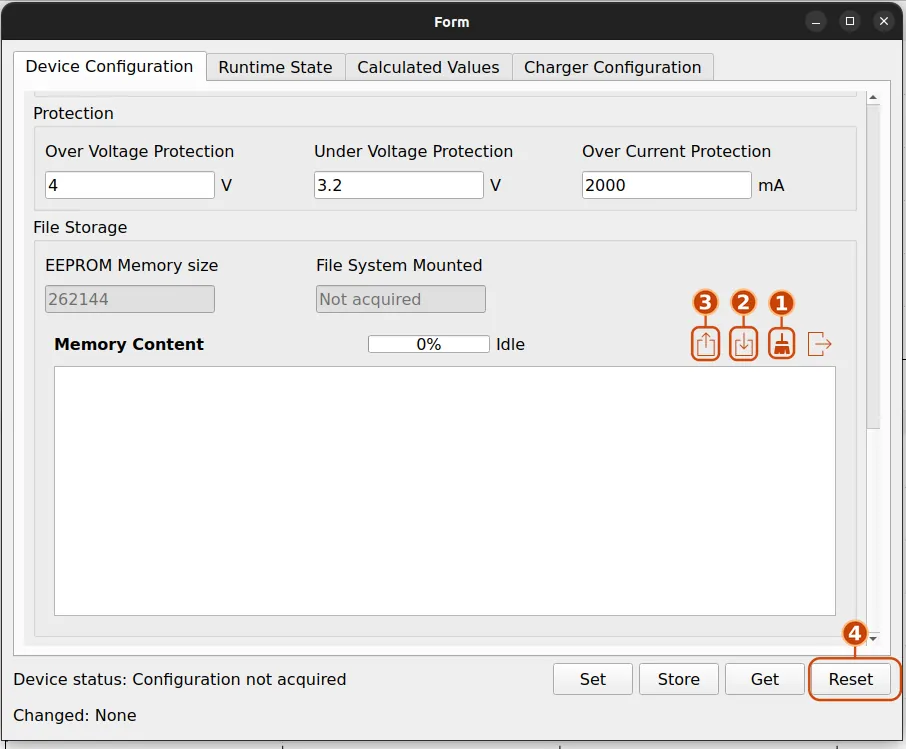
Notice the EEPROM Memory size field: 262144 bytes. That's not a coincidence: it's the exact same 256 KiB figure image/gen.py targets and stat reports back once the image is built. File System Mounted shows whether the board currently recognizes a LittleFS filesystem in that memory, and Memory Content is where the raw bytes get displayed (and written), with a progress bar tracking whatever operation is running.
Getting a freshly generated image onto the board comes down to four steps:
- Format: click the brush icon in the Memory Content toolbar first, to clear out whatever is currently stored in the device's EEPROM.
- Load: click the down-arrow icon and point it at the image from
image/gen.py(orsystem/gen.py, for a Charger). This is the step that actually transfers the file and programs it into the device's memory; the progress bar tracks how far along it is. - Read: click the up-arrow icon to read the memory straight back from the device into the Memory Content view. This one doesn't change anything, it's purely there so you can confirm the bytes on the board match the image you just loaded.
- Reset: click Reset down in the action bar. The board reboots, and from that point on it behaves like a freshly manufactured unit: the firmware Configuration service reads the System parameters and, on the EPP, mounts the LittleFS filesystem straight from what was just written.
That last step is easy to skip by accident, but it's not optional: until the board resets, it's still running on whatever configuration it booted with, and the new image only takes effect once the Configuration service reads it again from a cold start.
From Build-Time Configuration to Runtime Parameters
So that's the host-side half of the OpenEPT parameter lifecycle: a device's parameters start out as a plain-text systemParams.txt, and the tools in the OpenEPT Utilities repository turn that into whatever binary representation the target non-volatile storage actually expects. On the firmware side, none of this really matters to most of the codebase. When a device boots, the Configuration service reads whatever persistent data is there and loads it into the runtime parameter database, and everything else talks to the Configuration service instead of going directly to EEPROM, System memory, or the filesystem.
For the EPP that also means preparing the LittleFS region, either on its own or combined with the System region into the full 256 KiB image. The Charger skips that step entirely, since its current storage doesn't include a filesystem. Firmware defines how these parameters get interpreted at runtime; the Utilities repository is what prepares, generates, inspects, and reproduces their persistent form before a device is ever programmed. And because the format and generation mechanism are shared, adding a new OpenEPT device down the line should mostly mean pointing the same tools at a new device type, System size, and serial-number setup, rather than building a new configuration pipeline from scratch.