A Unified Parameter Configuration Mechanism for OpenEPT
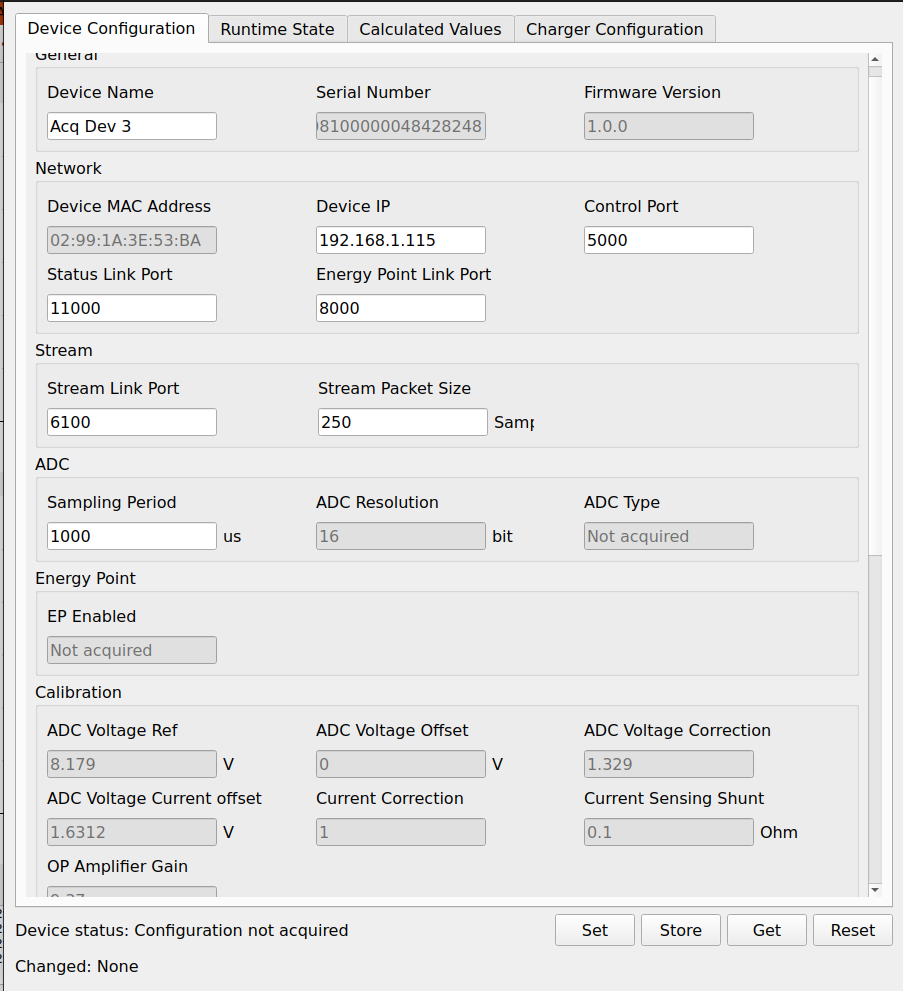
As the OpenEPT ecosystem has grown, configuration has become significantly more important than simply exposing a set of constants that can be changed in firmware. The Energy Profiler Probe now contains configurable measurement, communication, protection, and calibration parameters, while the OpenEPT Charger introduces its own charging and battery-related configuration. At the same time, the desktop application must be able to discover, display, modify, store, and restore these parameters without implementing a separate graphical workflow for every new device feature. As part of Milestone 3 of the second OpenEPT development phase, we therefore introduced a unified parameter configuration mechanism covering both the embedded firmware and the OpenEPT GUI.
The main goal was to establish a clear separation between:
- parameter definitions and their current values;
- default and configured values;
- system and user-configurable parameters;
- volatile runtime representation and persistent storage;
- device-side parameters and application-side parameters;
- parameter management and their graphical representation.
The resulting architecture is used by both the Energy Profiler Probe (EPP) and the OpenEPT Charger, while the GUI provides a common parameter model used to represent and configure both devices.
In This Update
This development update describes the complete OpenEPT parameter configuration mechanism from the firmware to the graphical interface. The implementation is divided into three main parts:
- Firmware Parameter Model – a common representation of parameters, their types, default values, access properties, and storage behavior.
- Persistent Configuration – loading and storing parameters using the storage available on the corresponding OpenEPT device.
- GUI Parameter Model – a metadata-driven parameter database used to dynamically construct configuration interfaces and connect them with the corresponding firmware parameters.
Rather than treating the Energy Profiler and Charger as two unrelated configuration systems, the implementation follows the same fundamental model and adapts only the persistent storage and device-specific parameter definitions where required.
Firmware Configuration Architecture
The firmware configuration mechanism is implemented primarily through the configuration and configurationDef modules.
The same basic parameter model is used by both the Energy Profiler Probe and the OpenEPT Charger:
configurationDef.cdefines the available parameters and their default properties;configurationDef.hdefines the common parameter representation;configuration.cmaintains the runtime parameter database and implements loading, storing, searching, and updating;configuration.hexposes the Configuration service interface to the remaining firmware services.
The complete Configuration service implementation is available in the corresponding firmware repositories:
- Energy Profiler Probe: Configuration Service
- OpenEPT Charger: Configuration Service
At firmware level, configuration is not represented as a collection of unrelated global variables. Instead, every configurable value is represented by a common parameter structure as it is presented bellow:
typedef struct
{
    char name[CONFIGURATION_MAX_PARAM_VALUESIZE];
    uint8_t value[CONFIGURATION_MAX_PARAM_VALUESIZE];

    configuration_param_type_t type;

    uint8_t readOnly;
    uint8_t defaultValue;
    uint8_t systemParam;

} configuration_param_t;
Each parameter therefore contains not only its current value, but also information describing how that value should be treated by the configuration system. The parameter type is explicitly represented as:
typedef enum
{
    CONFIGURATION_PARAM_TYPE_STRING = 0,
    CONFIGURATION_PARAM_TYPE_INT,
    CONFIGURATION_PARAM_TYPE_FLOAT

} configuration_param_type_t;
Although values are internally stored in a common string representation, the type information allows the Configuration service to expose typed interfaces to the rest of the firmware. For example, firmware services can request parameters using functions such as:
CONFIGURATION_GetParameter_Int(...);
CONFIGURATION_GetParameter_Float(...);
CONFIGURATION_GetParameter_String(...);
and update them through the corresponding typed interfaces. This keeps the persistent representation simple while preventing every firmware service from having to implement its own parsing and storage mechanism.
EPP File System
The Energy Profiler Probe uses LittleFS as the persistent file system for user configuration and other firmware-managed files.
The relevant file-system implementation is located in the Energy Profiler Probe firmware repository:
- LittleFS library:
Middlewares/Third_Party/littlefs - File System service:
CM7/Core/Middlewares/Services/FileSystem
The Configuration service uses this layer to load and store the persistent EPP user configuration, while board-specific System parameters are handled separately.
In addition to the dedicated storage used for board-specific System parameters, the Energy Profiler Probe contains a persistent file system used for storing normal device configuration and other persistent files required by the firmware.
Default Parameters
Every OpenEPT device contains a compile-time table describing the available parameters and their initial values. When the Configuration service starts, these definitions are used to initialize the runtime parameter database, ensuring that every parameter has a valid value before any persistent configuration is processed. The compiled values therefore act as fallback values. During initialization, the Configuration service attempts to load the available persistent configuration and updates the corresponding entries in the runtime parameter table. Parameters for which no stored value is available simply retain the value defined in the firmware. This state is explicitly tracked using the defaultValue member:
uint8_t defaultValue;
All parameters initially created from the compile-time definition are marked as using their default value. When a value is successfully obtained from persistent storage or explicitly updated, the Configuration service clears this flag:
param->defaultValue = 0;
The runtime parameter table can therefore contain a mixture of parameters loaded from persistent configuration and parameters that still use their firmware-defined defaults. This is particularly useful when the firmware introduces new parameters that are not present in an older stored configuration: the new parameters automatically remain at their defined defaults while the existing parameters are restored normally. The defaultValue flag also allows the Configuration service to identify and report parameters for which no persistent value was found during initialization.
System and User Configuration Parameters
Another important property is:
uint8_t systemParam;
The OpenEPT configuration mechanism distinguishes between parameters that belong to the normal user configuration and parameters describing the device itself. A typical system parameter is a hardware serial number or another hardware-dependent value that should follow the physical board rather than a configuration file. This distinction is particularly important when configuration is exported, copied, reset, or restored. For example, when normal configuration parameters are serialized, system parameters can be excluded:
for(uint32_t i = 0; i < prvCONFIGURATION_DATA.paramsCount; i++)
{
    configuration_param_t* param =
        &prvCONFIGURATION_DATA.params[i];

    if(param->systemParam == 1U)
    {
        continue;
    }

    /* Serialize user configuration parameter. */
}
Conversely, when system information is restored from board memory, only parameters explicitly marked as system parameters are considered.
if(param->systemParam == 0U)
{
    continue;
}

if(strcmp(param->name, key) == 0)
{
    /* Update system parameter. */

    param->defaultValue = 0;
}
This separation allows OpenEPT to maintain portable user configuration while keeping board-specific information attached to the corresponding physical device.
Searching the Runtime Parameter Database
Once initialized, the runtime parameter table becomes the central source of configuration information for the remaining firmware. Parameters are identified by their textual key. The basic lookup mechanism is intentionally simple:
static configuration_param_t*
prvCONFIGURATION_GetParam(const char* key)
{
    if(key == NULL)
    {
        return NULL;
    }

    for(uint32_t i = 0;
        i < prvCONFIGURATION_DATA.paramsCount;
        i++)
    {
        configuration_param_t* param =
            &prvCONFIGURATION_DATA.params[i];

        if(strcmp(param->name, key) == 0)
        {
            return param;
        }
    }

    return NULL;
}
Firmware services therefore do not need to know where a parameter was originally stored or whether its current value came from the default table, file system, or EEPROM. They only request the parameter by its key.
Configuration Service
The parameter database is managed by a dedicated Configuration service implemented as a FreeRTOS task. The service separates configuration operations from the firmware modules that consume the parameters. During initialization, the service constructs the runtime parameter table and loads the available persistent configuration. After initialization, configuration requests are processed asynchronously through FreeRTOS task notifications. A simplified representation of the mechanism is:
CONFIGURATION task:

    INIT:

        copy compiled default parameters
            -> runtime parameter table

        load persistent user configuration

        load persistent system parameters

        report parameters still using defaults

        -> SERVICE


    SERVICE:

        wait for configuration request

        if parameter update requested:
            locate parameter
            verify access
            update runtime value
            clear default flag

        if configuration reload requested:
            read persistent configuration
            update runtime table

        if configuration store requested:
            serialize configuration
            write persistent storage

        -> SERVICE


    ERROR:

        report configuration error
The exact persistent storage differs between the Energy Profiler Probe and the Charger, but the parameter model and runtime behavior remain the same.
Energy Profiler Probe Configuration
The Energy Profiler Probe uses the generic configuration mechanism for a considerably larger set of parameters. For example, the default parameter table contains general device parameters:
{
    .name = "DEV_NAME",
    .value = "Acq Device",
    .type = CONFIGURATION_PARAM_TYPE_STRING,
    .readOnly = 1,
    .defaultValue = 1,
    .systemParam = 0
},
{
    .name = "HW_SERIAL",
    .value = "0123456789",
    .type = CONFIGURATION_PARAM_TYPE_STRING,
    .readOnly = 1,
    .defaultValue = 1,
    .systemParam = 1
},
{
    .name = "FW_VERSION",
    .value = "2.0.0",
    .type = CONFIGURATION_PARAM_TYPE_STRING,
    .readOnly = 0,
    .defaultValue = 1,
    .systemParam = 1
}
The same table also contains measurement-related parameters such as the shunt resistance and analog gain:
{
    .name = "SENS_SHUNT",
    .value = STR(CONF_DPCONTROL_SHUNT_VALUE),
    .type = CONFIGURATION_PARAM_TYPE_FLOAT,
    .readOnly = 1,
    .defaultValue = 1,
    .systemParam = 1
},
{
    .name = "SENS_GAIN",
    .value = STR(CONF_DPCONTROL_INA_GAIN),
    .type = CONFIGURATION_PARAM_TYPE_FLOAT,
    .readOnly = 0,
    .defaultValue = 1,
    .systemParam = 1
}
Calibration, network, acquisition, protection, and other device parameters are handled through the same structure.
This is one of the main advantages of the mechanism: adding a new configuration parameter does not require introducing a separate storage architecture. The parameter is added to the configuration definition and then becomes part of the same lookup, access, persistence, and GUI mechanisms.
EPP Configuration Loading
For the Energy Profiler Probe, configuration initialization follows several stages.
First, the compiled defaults are copied into the runtime table:
prvCONFIGURATION_InitParams();
The normal device configuration is then loaded from the file system:
prvCONFIGURATION_UpdateFromFS();
Finally, board-specific system parameters are obtained from the corresponding persistent board memory:
prvCONFIGURATION_UpdateSystemParamFromBD();
A missing persistent value is not treated as a fatal configuration error. The corresponding parameter simply remains at its defined default value. This makes firmware updates and introduction of new parameters considerably easier: a newly introduced parameter already has a valid value even when it does not exist in configuration stored by an older firmware version.
Persistent EPP Configuration
When the current EPP configuration is stored, parameters are serialized into a textual key-value representation.
Conceptually:
PARAMETER_A:value
PARAMETER_B:value
PARAMETER_C:value
System parameters are excluded from the normal user configuration serialization and remain associated with board-level storage. The reverse operation parses the stored representation, searches the runtime parameter table for matching keys, and replaces the corresponding default values. The storage representation is therefore independent from the order of parameters in the compiled table. Parameters are resolved by name rather than by relying on a fixed binary structure. This is particularly useful as the firmware evolves because the parameter set can be extended without requiring the complete configuration structure to remain binary-compatible with older versions.
OpenEPT Charger Configuration
The OpenEPT Charger follows the same fundamental parameter model, but defines parameters specific to battery charging.
The current configuration includes:
{
    .name = "HW_SER",
    .value = "0123456789",
    .type = CONFIGURATION_PARAM_TYPE_STRING,
    .readOnly = 1,
    .defaultValue = 1,
    .systemParam = 1
},
{
    .name = "FW_VER",
    .value = "1.0.0",
    .type = CONFIGURATION_PARAM_TYPE_STRING,
    .readOnly = 0,
    .defaultValue = 1,
    .systemParam = 1
},
{
    .name = "CH_CUR",
    .value = "100",
    .type = CONFIGURATION_PARAM_TYPE_INT,
    .readOnly = 0,
    .defaultValue = 1,
    .systemParam = 1
},
{
    .name = "TERM_VOLT",
    .value = "4.2",
    .type = CONFIGURATION_PARAM_TYPE_FLOAT,
    .readOnly = 0,
    .defaultValue = 1,
    .systemParam = 1
},
{
    .name = "TERM_CUR",
    .value = "3",
    .type = CONFIGURATION_PARAM_TYPE_INT,
    .readOnly = 0,
    .defaultValue = 1,
    .systemParam = 1
},
{
    .name = "MAX_CUR",
    .value = "5",
    .type = CONFIGURATION_PARAM_TYPE_INT,
    .readOnly = 0,
    .defaultValue = 1,
    .systemParam = 1
}
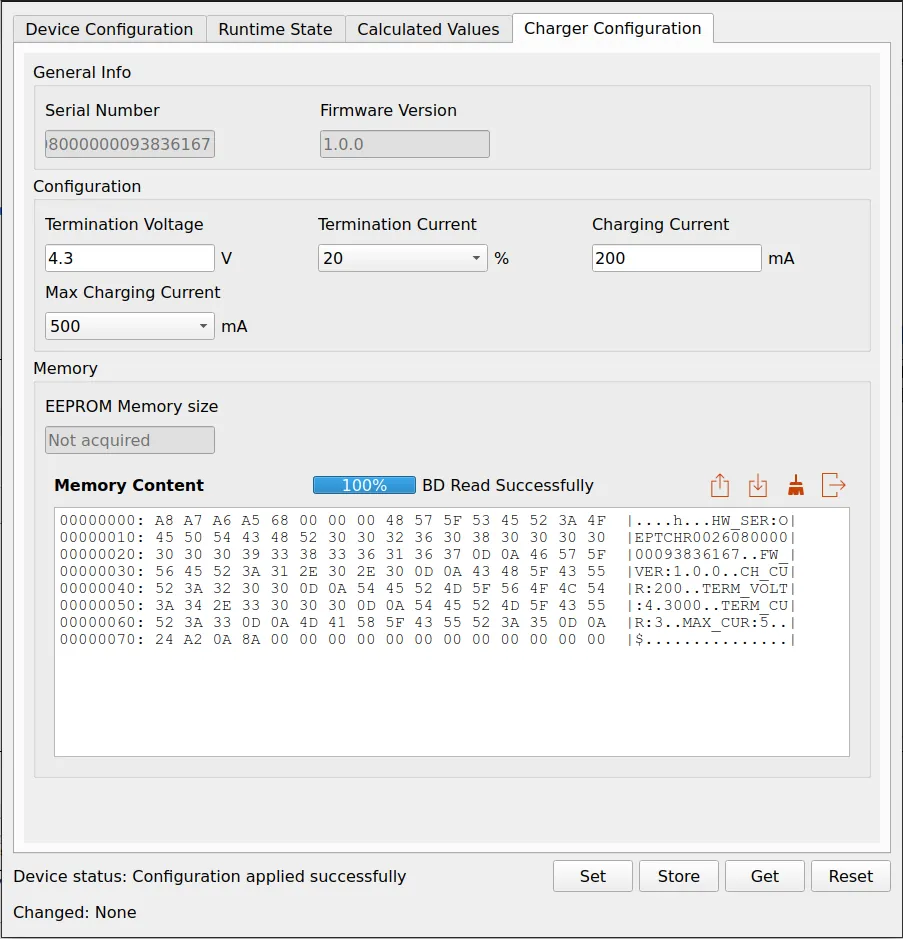
These parameters define both device information and the charging behavior, including the charging current, termination voltage, termination current, and maximum charging current. The important point is that these values are not implemented as an isolated Charger-specific configuration mechanism. They use the same configuration_param_t representation and the same concept of default values, read-only properties, parameter lookup, and typed access used by the EPP firmware.
Charger EEPROM Storage
The main difference is where persistent Charger information resides.
The Charger board contains an AT24CS01 EEPROM, which provides 128 bytes of non-volatile storage together with a dedicated factory-programmed serial-number region. The low-level EEPROM driver exposes operations for:
AT24CS01_Ping(...);

AT24CS01_ReadByte(...);
AT24CS01_WriteByte(...);

AT24CS01_Read(...);
AT24CS01_Write(...);
The Configuration service sits above this driver. Consequently, higher-level firmware services do not directly access EEPROM addresses when they need a configuration parameter. They request the parameter from the Configuration service, while the Configuration service manages the relationship between the runtime representation and the persistent storage. This gives the Charger the same logical configuration workflow as the EPP.
Why the Common Firmware Model Matters
The EPP and Charger have different responsibilities and different persistent storage requirements, but they now expose configuration using the same basic concepts.
A parameter has:
key
value
type
read-only state
default-value state
system/user classification
and the Configuration service provides the operations required to:
define
  -> initialize
      -> load
          -> search
              -> read / modify
                  -> serialize
                      -> persist
This becomes increasingly important as OpenEPT grows. Without such a layer, every new configurable subsystem would require its own parameter variables, communication commands, parsing rules, persistence mechanism, and GUI implementation. The common configuration model instead provides a stable boundary between the device functionality and the way configuration is transported or presented.
From Firmware Parameters to GUI Parameters
The desktop application follows the same design principle, although its parameter representation contains additional metadata required by a graphical application.
At the center of the GUI implementation is the ParameterStore. Rather than implementing individual Qt variables for every device parameter, the GUI maintains a database of Params::Param objects indexed by a unique key. The basic parameter definition is:
struct ParamMeta
{
    QString key;
    QString displayName;
    QString description;
    QString unit;

    GroupId group;
    SubGroupId subGroup;

    Access access;
    Storage storage;
    Target target;

    QVariant defaultValue;
    QVariant minValue;
    QVariant maxValue;

    QStringList allowedValues;

    bool visible;
    int order;

    Editor editor = Editor::LineEdit;
};

struct Param
{
    ParamMeta meta;
    QVariant value;
    bool initialized;

    std::function<bool(const QVariant&)> setFn;
    std::function<void()> getFn;
};
This representation provides substantially more information than the firmware requires because the same database is also used to determine how a parameter should be presented and manipulated by the GUI.
Access, Storage, and Target
Three metadata properties are particularly important. Parameter access is represented as:
enum class Access
{
    ReadWrite,
    ReadOnly,
    RuntimeOnly
};
Persistent behavior is represented as:
enum class Storage
{
    None,
    SaveOnly,
    LoadSave
};
and the parameter owner is represented through:
enum class Target
{
    Device,
    Application,
    Runtime,
    Calculated,
    ChargerConfig
};
This allows the GUI to answer questions such as:
- Should this parameter be editable?
- Should it be displayed as read-only information?
- Should its value be stored by the application?
- Should it be loaded from an application configuration file?
- Does the parameter belong to the EPP?
- Does it belong to the Charger?
- Is it an application parameter?
- Is it only a runtime value?
without embedding those decisions into individual widgets.
ParameterStore
The ParameterStore class provides the central parameter database.
Definitions are loaded into maps:
void ParameterStore::setDefinition(
const QList<Params::GroupMeta> &groups,
const QList<Params::SubGroupMeta> &subGroups,
const QList<Params::Param> ¶ms)
{
m_groupMeta.clear();
m_subGroupMeta.clear();
m_params.clear();
for(const auto &group : groups)
{
m_groupMeta.insert(group.id, group);
}
for(const auto &subGroup : subGroups)
{
m_subGroupMeta.insert(subGroup.id, subGroup);
}
for(const auto ¶m : params)
{
m_params.insert(param.meta.key, param);
}
}
The parameter key therefore plays essentially the same role as the parameter name in the firmware configuration table.
Values can subsequently be obtained through:
getParamValue(key);
getParamVariant(key);
or modified through:
setParamValue(key, value);
setParamVariant(key, value);
Before accepting a new value, ParameterStore normalizes and validates it against its metadata.
QVariant normalizedValue =
    normalizeValue(param.meta, value, &normalizeOk);

if(!normalizeOk)
{
    return false;
}

if(!validateValue(param.meta, normalizedValue))
{
    return false;
}
A parameter definition can therefore include constraints such as minimum and maximum values or a fixed set of allowed values.
Parameter Groups
Parameters are additionally organized into groups and subgroups. For the connected OpenEPT device, the current GUI model defines groups including:
DeviceConfig
ApplicationConfig
RuntimeState
Calculated
ChargerConfig
and subgroups including:
General
Network
Stream
ADC
EnergyPoint
Processing
Calibration
Load
ChargerGeneral
Battery
Protection
Statistics
FileStorage
ChargerConf
ChargerBD
The important architectural consequence is that these groups are not merely labels. They are metadata consumed by the graphical configuration layer. This allows the same ParameterStore to contain configuration, runtime information, calculated values, and Charger-related information while preserving a clear logical organization.
Dynamically Building the Configuration GUI
One of the most important results of this architecture is that the configuration window no longer needs to contain a manually implemented Qt widget for every individual parameter. ConfigurationWnd obtains the available parameter groups directly from the ParameterStore:
QList<Params::GroupMeta> groups =
    m_params->getAllGroupMeta();

for(const Params::GroupMeta &groupMeta : groups)
{
    QWidget *tab = createTab(groupMeta.id);

    if(tab != nullptr)
    {
        tabWidget->addTab(
            tab,
            groupMeta.name
        );
    }
}
The GUI can then use each parameter's metadata to determine:
- its display name;
- unit;
- description;
- order;
- group and subgroup;
- whether it is visible;
- whether it is editable;
- which editor should be used.
For example, a parameter can be rendered using either a standard line editor or a combo box according to its definition.
if(param.meta.editor == Params::Editor::ComboBox)
{
    QComboBox *comboBox = new QComboBox(this);

    comboBox->addItems(
        param.meta.allowedValues
    );

    field = comboBox;
}
else
{
    QLineEdit *lineEdit =
        new QLineEdit(this);

    field = lineEdit;
}
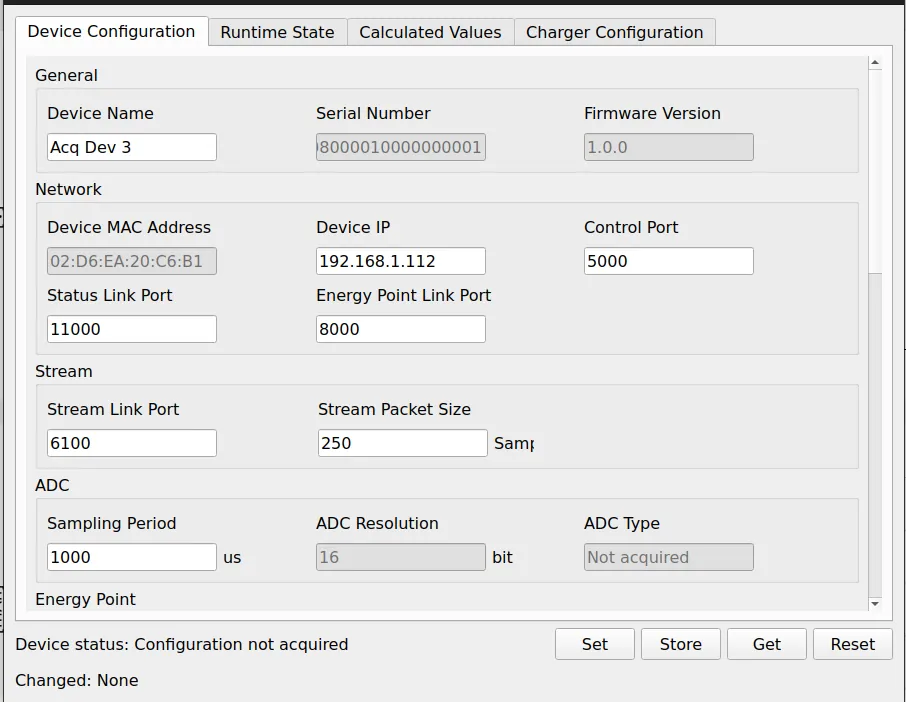
The parameter database therefore determines the structure of the configuration interface. This is a major difference from the previous approach where extending the firmware configuration would also require manually extending the corresponding GUI layout.
EPP Parameters in the GUI
The EPP parameter definitions map firmware functionality into user-facing metadata. For example, a device parameter can be represented as:
{
    {
        "deviceSerial",
        "Serial Number",
        "Device Serial Number",
        "",

        DeviceParamDefs::DeviceConfig,
        DeviceParamDefs::General,

        Params::Access::ReadOnly,
        Params::Storage::LoadSave,
        Params::Target::Device,

        {},
        {},
        {},
        {},

        true,
        1
    },

    "",
    false
}
The GUI therefore knows that this parameter:
- belongs to the device configuration;
- should appear in the General section;
- is read-only;
- belongs to the connected device;
- can participate in the corresponding storage workflow;
- should be visible in the interface.
The same mechanism is used for network, acquisition, ADC, Energy Point, protection, calibration, and other EPP parameters.
Charger Parameters in the GUI
The Charger is integrated into exactly the same parameter infrastructure.
A dedicated group is defined as:
{
    DeviceParamDefs::ChargerConfig,
    "Charger Configuration",
    "Charger Configuration if it is connected",
    4
}
with Charger-specific subgroups including:
ChargerGeneral
ChargerConf
ChargerBD
This means that adding Charger support did not require implementing another parameter-management framework. Instead, Charger parameters are added to the same metadata database and assigned:
Params::Target::ChargerConfig
where appropriate.
The configuration window can then construct the Charger Configuration tab using the same mechanism used for the EPP.
Tracking Parameter Changes
The GUI also tracks the relationship between the value currently shown in a field and the value that was last applied to the connected device. When a user changes a parameter locally, the configuration window can identify that the field has been modified but not yet applied. The parameters can then be separated according to their configuration group before being sent to the corresponding target. This gives the GUI enough information to support a controlled Get → Modify → Set → Store workflow rather than immediately writing every field change to the connected hardware.
Persistent GUI Configuration
The same ParameterStore abstraction is also used for parameters belonging to the desktop application itself. Parameters marked with the appropriate storage policy can be serialized to JSON:
QJsonObject ParameterStore::toJson(
bool includeSaveOnly) const
{
QJsonObject object;
for(auto it = m_params.constBegin();
it != m_params.constEnd();
++it)
{
const auto ¶m = it.value();
if(param.meta.storage ==
Params::Storage::None)
{
continue;
}
object.insert(
param.meta.key,
QJsonValue::fromVariant(param.value)
);
}
return object;
}
and subsequently restored using the same parameter keys. This means that the same conceptual configuration model is used at all levels of OpenEPT.
One Parameter Model, Multiple OpenEPT Components
The main result of this milestone is therefore not simply the introduction of several new configuration dialogs. The more important result is the establishment of a common parameter architecture across the OpenEPT ecosystem. At firmware level, EPP and Charger parameters share the same fundamental representation:
name
value
type
readOnly
defaultValue
systemParam
At GUI level, this information is extended with presentation and application metadata:
key
displayName
description
unit
group
subGroup
access
storage
target
defaultValue
range
allowedValues
visibility
editor
The two layers solve different problems, but they are based on the same idea: device functionality should consume configuration through a structured parameter layer rather than directly depending on where and how individual values are stored or displayed.. This makes the configuration mechanism easier to extend as new OpenEPT functionality is introduced. A new parameter can be defined in firmware, connected to its corresponding communication command, described in the GUI parameter database, and automatically integrated into the existing configuration workflow without introducing another independent configuration subsystem.